Reposted from: Microsoft Cloud Computing: Microsoft Azure Chinese Blog Max Shen (沈云) Technical Solutions Professional
Azure SQL uses the Database Transaction Unit (DTU) and the elastic Database Transaction Unit (eDTU) as units of measure. But what exactly are DTUs and eDTUs? The official documentation explains it like this: A DTU is a unit of resource measurement that represents the resources guaranteed to be available to a single Azure SQL database at a specific performance level within a single-database service tier. A DTU is a blended measure of CPU, memory, data I/O and transaction log I/O in a certain ratio, determined by an OLTP benchmark workload (designed to be representative of real-world OLTP workloads).
That passage is a bit hard to digest. "CPU, memory and database I/O in a certain ratio" leaves you scratching your head. And on top of that, the ratio of those resources is determined by an OLTP benchmark workload, which is yet another new concept. See: https://www.azure.cn/documentation/articles/sql-database-benchmark-overview/
Simply put, a DTU is a metric for the compute power of the SQL service Azure provides. The higher the number, the more compute power the SQL service has. For example, 100 DTUs should be 20 times as powerful as 5 DTUs.
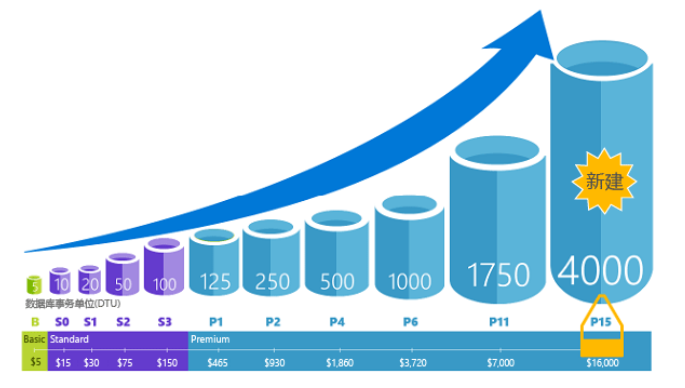
For evaluating DTU performance, refer to the table below:
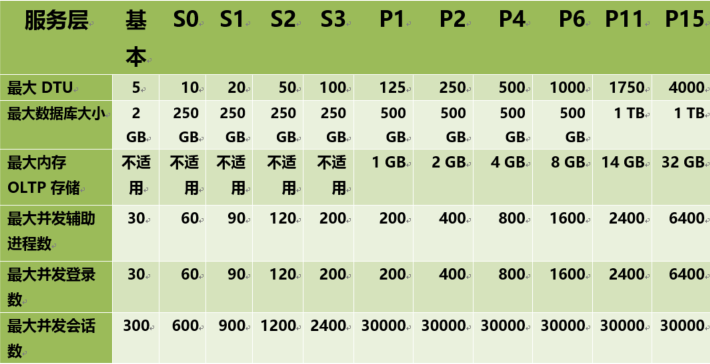
By matching the metrics collected from your on-premises database against the table above, you can estimate which Azure SQL tier you should use. Of course, you can still change the service tier after choosing it. To work out how many DTUs your own application needs, you can do a detailed assessment with the following tool: Azure SQL Database DTU Calculator So, think of a DTU as the performance unit of Azure databases.
So what is an eDTU? Although DTUs aren't that easy to understand, architecturally they're nothing more than providing database services to an application, which is the model we commonly use and is simple to work with. We call this a single database. To understand eDTUs, we first need to talk about what Azure elastic databases are.
In the cloud era, however, there's a typical problem: almost every application has peaks and troughs. Once a single database is allocated, its resources are provisioned, with no distinction between peaks and troughs. So how do we solve this? There are usually two options: (1) over-provision resources based on peak usage and pay extra for it, or (2) under-provision to save costs, at the risk of degraded performance during peaks and lower customer satisfaction.
Elastic databases were created to solve exactly this problem. Elastic pools solve it by ensuring that databases get the performance resources they need when they need them. They provide a simple resource allocation mechanism within a predictable budget.
Think of it this way: we can create an elastic database pool, and multiple databases use this pool, making full use of its resources. Pools are well suited to a large number of databases with a specific usage pattern. For a given database, this pattern is characterized by low average usage with relatively infrequent usage spikes. The more databases you can add to the pool, the more you save. Depending on your application's usage pattern, you may see savings with as few as two S3 databases.
The figure below shows an example of a database that spends a lot of time idle but also periodically has spikes of activity. This is a usage pattern suited to a pool:
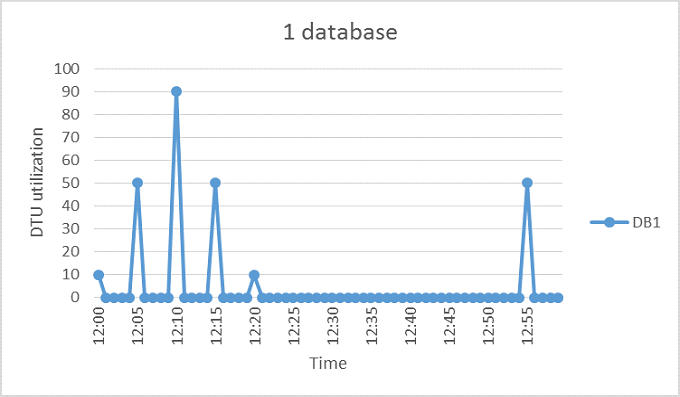
During the five-minute period shown, DB1 peaks at 90 DTUs, but its overall average usage is under five DTUs. As a single database, running this workload requires the S3 performance level, but most of the resources sit unused during periods of low activity.
A pool lets these unused DTUs be shared across multiple databases, reducing the number of DTUs needed and the overall cost.
Building on the previous example, suppose there are other databases with usage patterns similar to DB1. In the next two figures, the usage of 4 databases and of 20 databases is layered onto the same graph to illustrate the non-overlapping nature of their usage over time:
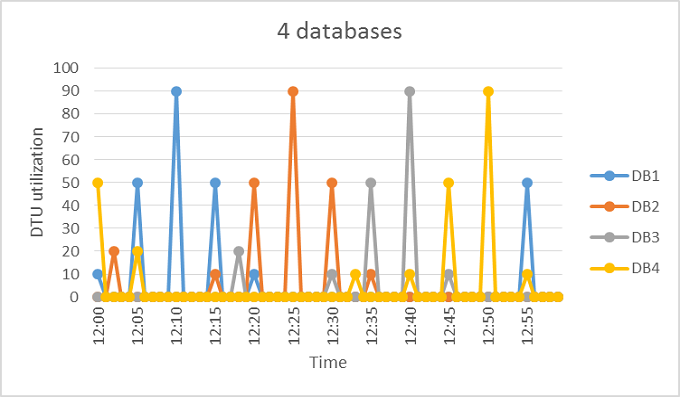
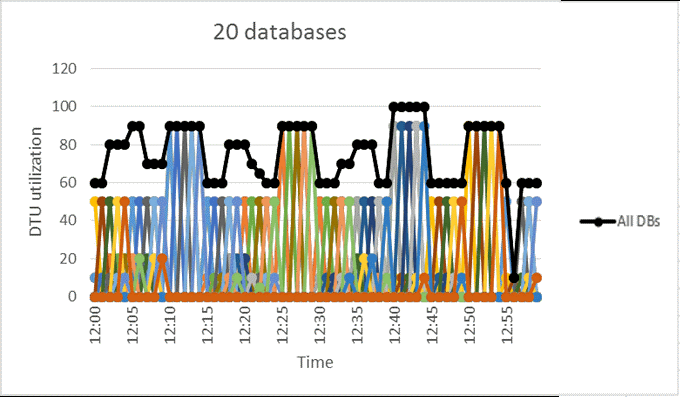
In the figure above, the black line shows the aggregate DTU usage across all 20 databases. It shows that aggregate DTU usage never exceeds 100 DTUs, indicating that the 20 databases can share 100 eDTUs over this period. Compared with putting each database at the S3 performance level as a single database, this results in a 20x reduction in DTUs and a 13x lower price.
This example is ideal for the following reasons:
- There are large differences between peak usage and average usage for each database.
- The peak usage of each database occurs at different points in time.
- eDTUs are shared among multiple databases.
The price of a pool depends on the pool's eDTUs. Although the unit price of a pool eDTU is 1.5 times the unit price of a single-database DTU, pool eDTUs can be shared by many databases, so fewer total eDTUs are needed. These differences in pricing and eDTU sharing are the basis of the cost savings pools can provide.
So an eDTU is the concept of pooled DTUs: the performance of individual databases can be adjusted dynamically, and databases can be added to or removed from the pool.
For more information and details, see the SQL Database documentation https://www.azure.cn/blog/2017/02/28/AzureDtuAndEdtu