1. Overview
Some corporate networks need a specific routing exit for employees to use. Here we'll show how to configure a specific routing exit over a ZeroTier One network.
ZeroTier One is an open-source application that connects network traffic across different locations through peer-to-peer encryption, giving you secure network communication.
In this article we'll walk through configuring a routing exit over a ZeroTier One network.
2. Prerequisites
Before working through the tasks in this article, you'll need the following:
- A server running Ubuntu 20.04, with a user that has sudo privileges on it.
- A ZeroTier One account. You can visit the ZeroTier One website and sign up for one there.
- A local router already configured with ZeroTier One. If you haven't set one up yet, see Connecting Branch Office Networks with ZeroTier One for how to configure it.
Once these prerequisites are in place, you're ready to start.
3. Steps
-
Install ZeroTier One by following the instructions on the official website
curl -s https://install.zerotier.com | bashJoin the ZeroTier One network on the ZeroTier One router
zerotier-cli join <ZeroTier One 网络 ID>Go to the ZeroTier One management page, authorize this server to join the ZeroTier One network, and configure the server's IP address. In this article the server's IP is
10.0.0.1/24, and the IP address ZeroTier One assigns to the server is10.1.1.1/24. -
Check whether IP forwarding is enabled in the server's Linux kernel.
sudo sysctl -a | grep net.ipv4.ip_forwardIf it isn't enabled, enable it:
sudo sysctl -w net.ipv4.ip_forward=1 -
Configure
iptablesrulesUse the
ip addrcommand to find the network interface names. The output looks like this:1: lo: <LOOPBACK,UP,LOWER_UP> mtu 65536 qdisc noqueue state UNKNOWN group default qlen 1000 link/loopback 00:00:00:00:00:00 brd 00:00:00:00:00:00 inet 127.0.0.1/8 scope host lo valid_lft forever preferred_lft forever inet6 ::1/128 scope host valid_lft forever preferred_lft forever 2: eth0: <BROADCAST,MULTICAST,UP,LOWER_UP> mtu 1500 qdisc mq state UP group default qlen 1000 link/ether 00:0d:7a:c9:0f:62 brd ff:ff:ff:ff:ff:ff inet 10.0.0.1/24 brd 10.0.0.255 scope global eth0 valid_lft forever preferred_lft forever inet6 fe80::20d:3aff:fec9:f57/64 scope link valid_lft forever preferred_lft forever 3: zt0: <BROADCAST,MULTICAST,UP,LOWER_UP> mtu 2800 qdisc fq_codel state UNKNOWN group default qlen 1000 link/ether 5a:89:77:77:77:77 brd ff:ff:ff:ff:ff:ff inet 10.1.1.1/24 brd 10.1.1.255 scope global zt0 valid_lft forever preferred_lft forever inet6 fe80::5889:7777:7777:7777/64 scope link valid_lft forever preferred_lft foreverAdd the
iptablesrules as follows:sudo iptables -t nat -A POSTROUTING -o eth0 -j MASQUERADE sudo iptables -A FORWARD -m conntrack --ctstate RELATED,ESTABLISHED -j ACCEPT #允许服务器的网卡 eth0 转发所有来自 ZeroTier One 的流量 sudo iptables -A FORWARD -i zt0 -o eth0 -j ACCEPTSince
iptablesrules are lost when the server reboots, installiptables-persistentto make them persistent.sudo apt install iptables-persistent sudo netfilter-persistent saveIf your server stops forwarding traffic after a reboot, check whether the
iptablesrules were saved. -
Go to the ZeroTier One management console and configure the IP range to be routed. Here we use
8.8.8.0/24as an example.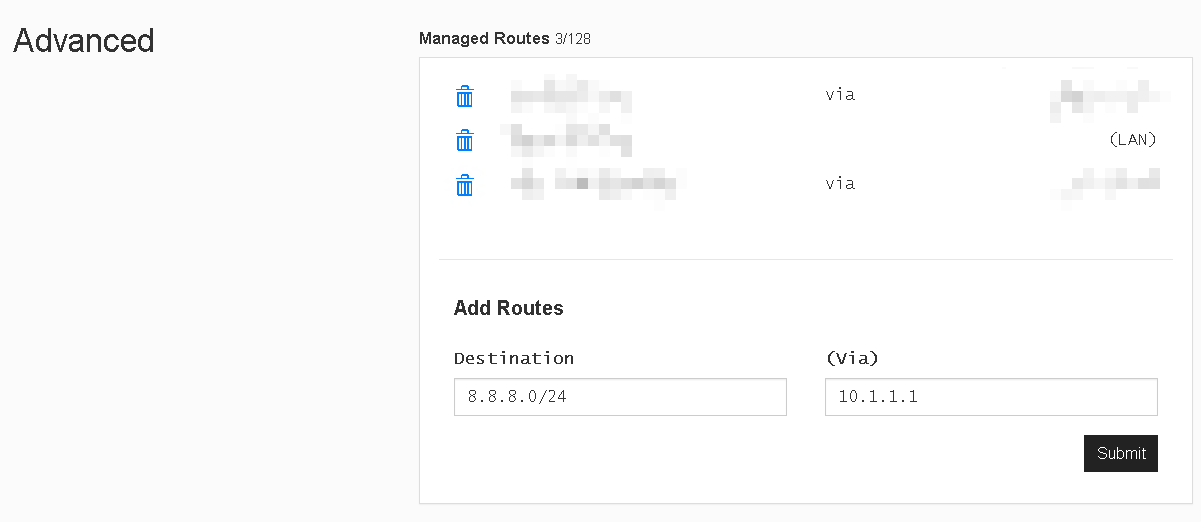
-
Next, configure the ZeroTier One client software to allow it to carry default route traffic. This changes the client's routing so that traffic is routed into the ZeroTier One network. Here we run the following on the local router:
sudo zerotier-cli set <ZeroTier One 网络 ID> allowDefault=1
sudo zerotier-cli set <ZeroTier One 网络 ID> allowGlobal=1
Each time the client's ZeroTier service restarts, these values are reset to 0, which means the client will no longer route into the ZeroTier One network. You'll need to run these commands again to re-enable the routing.
-
Client DNS settings
We recommend pointing clients at the company's internal DNS servers. This gives access to internal resources and also avoids resolving to incorrect IP addresses.
That completes the configuration. You can check the network status and manage network rules in the ZeroTier One management console.